// cd /blog/pc3-or-cmm2-g3
Pico Computer 3 or Colour Maximite 2 G3?
Both switch on into BASIC, plug into an HDMI screen and run the same MMBasic, the same MicroPython and the same book. One is built around the low-cost RP2350B, the other around a 480 MHz STM32H743 with 32 MB of SDRAM. Which is better for playing, for learning and for making new things? The answer is different for each.
In short
- For playing: the G3. Doom, Quake, ScummVM and a shelf of classic-computer emulators load from its SD card, and on the G3 they play on a 1080p TV with the sound coming out of it.
- For making things: the PC3. WiFi, Bluetooth, the RP2350's programmable I/O and a Qwiic socket come on a small, low-cost board, and a program finished on it runs on a Pico 2 W.
- For learning: either. The same MicroPython and the same book run on both. The PC3 adds a Unix-like operating system and the CMM2 adds a Forth.
- For speed: the CMM2. It ran the same BASIC programs two to three and a half times as fast as the PC3, and Python twice as fast. The gap is smallest in code that spends its time drawing. The measurements.
On this page
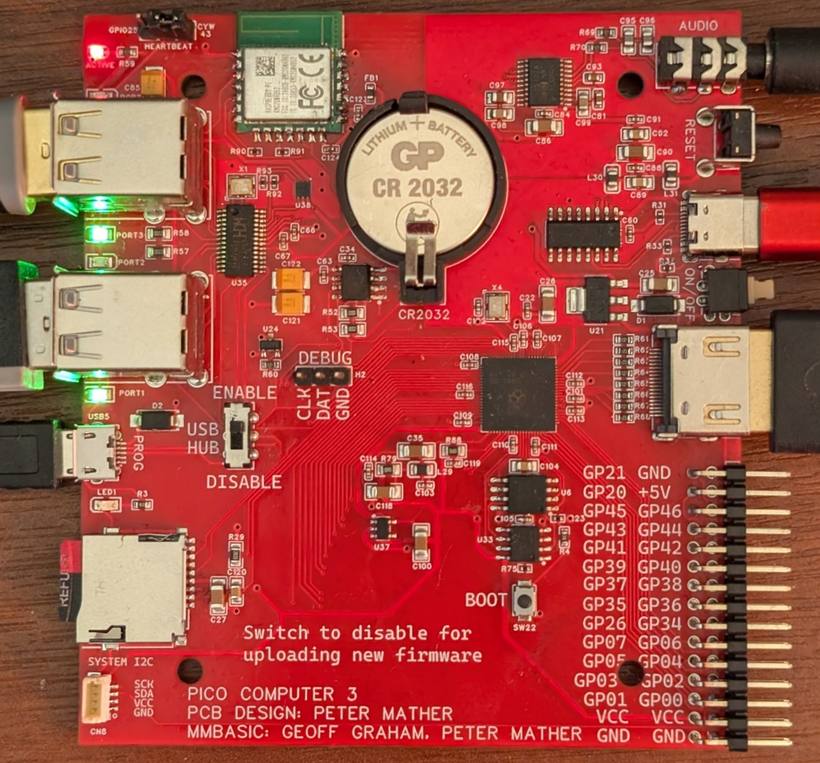
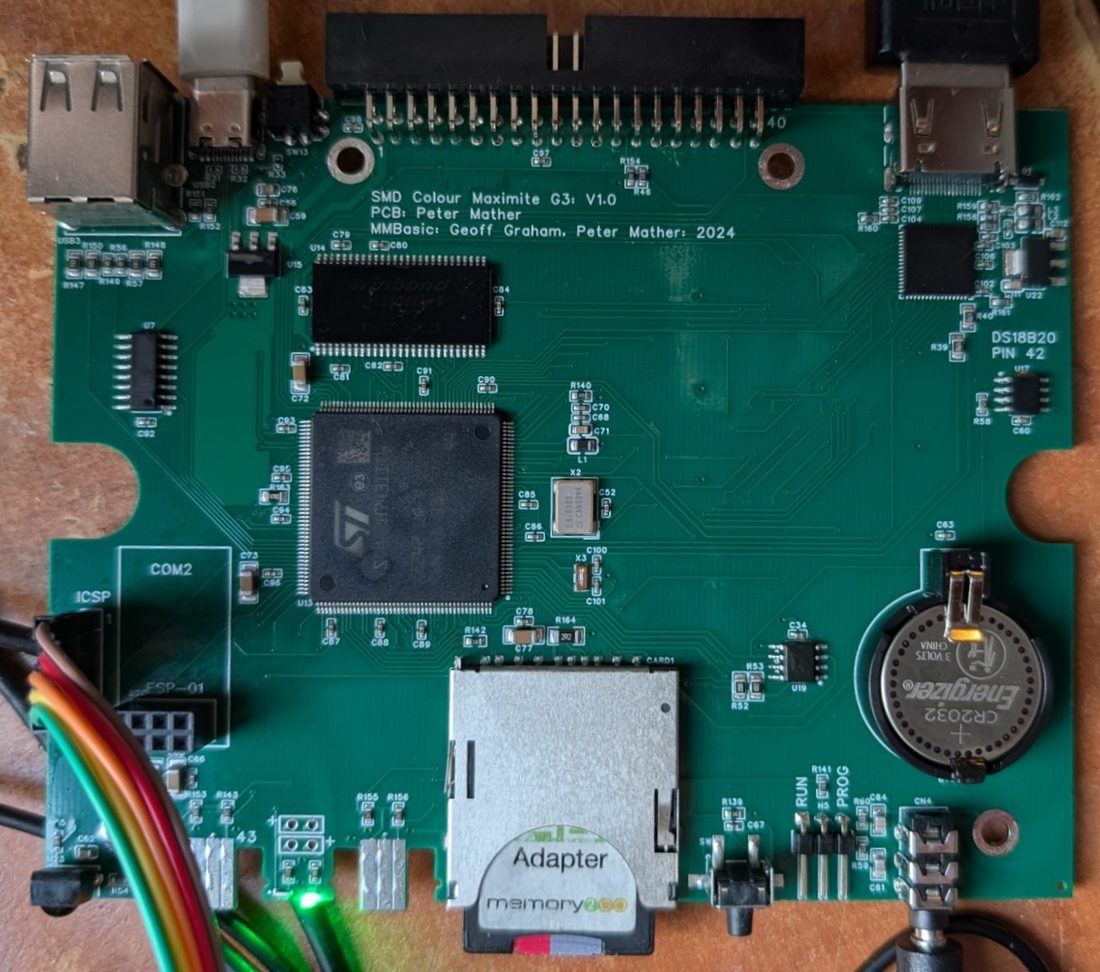
The two machines
The Pico Computer 3 is an RP2350B home computer that runs MMBasic, MicroPython or FUZIX. The G3 is the newest Colour Maximite 2: a Generation 2 board whose picture and sound go out through HDMI instead of VGA. Since MMBasic V7 the two run the same interpreter, so most of what follows is about the hardware around it.
| Pico Computer 3 | Colour Maximite 2 G3 | |
|---|---|---|
| Processor | RP2350B: two Arm Cortex-M33 cores, overclocked for HDMI (378 MHz in the timings below) | STM32H743: one Arm Cortex-M7 core at 480 MHz, with double-precision floating point |
| Memory | 520 KB on the chip, 8 MB of PSRAM, 16 MB of flash | 1 MB on the chip, 32 MB of SDRAM, 2 MB of flash |
| Room for BASIC | Programs up to 256 KB | Programs up to 512 KB, about 15 MB for variables |
| Picture | HDMI/DVI made by the RP2350 itself. Screen timings up to 1280 × 720, up to 32,768 colours in the lower-resolution modes | HDMI from an MS7210 transmitter. 19 modes up to 1920 × 1080 with up to 16-bit colour, pages and layers |
| Sound | PCM5102 32-bit stereo DAC, Bluetooth speakers and headphones | HDMI (16-bit) and a 12-bit DAC at the same time; Bluetooth speakers with the WiFi module |
| Wireless | WiFi and Bluetooth on the board (Raspberry Pi RM2) | WiFi and Bluetooth with the plug-on WiFi module, the same radio |
| USB | Four host ports through an on-board hub | One host port; low-speed devices must be plugged in directly |
| I/O | 30-pin header with 24 I/O pins, 7 of them analogue; programmable I/O (PIO); a Qwiic/STEMMA QT socket | 40-pin header; Wii controller socket, IR receiver, PS/2 mouse, CAN, a DS18B20 temperature sensor |
| Software | MMBasic (PicoMite V7.00.00), MicroPython or FUZIX, one at a time | MMBasic 8.00.00b2 (beta), with MicroPython, a C compiler, zeptoforth and 18 more apps run from the SD card |
| Design files | Both open, in EasyEDA Pro, with Gerbers, BOM and placement files with LCSC part numbers, in the Pico-Computer-3 repository | |
Speed
The CMM2 was faster in every comparison: two to three and a half times on BASIC and twice on Python. The same programs, with the same inputs, were run on both machines. The CMM2's figures come from a G2, which has the same processor, memory and firmware as the G3.
| Program | How it ran | PC3 | CMM2 | CMM2 faster by |
|---|---|---|---|---|
| Solar eclipse, a 3,200-line calculation | MMBasic | 15.6 s | 6.0 s | 2.6× |
MMBasic, OPTION COMPILE ON | 6.0 s | 1.7 s | 3.5× | |
| KnivD benchmark, grains (more is faster) | MMBasic | 8,868 | 18,732 | 2.1× |
MMBasic, OPTION COMPILE ON | 13,938 | 42,070 | 3.0× | |
| Solar eclipse in Python | MicroPython | 8.8 s* | 4.4 s | 2.0× |
| Solar eclipse turned into C on the machine | PC3: mmb2c and cc under FUZIX; CMM2: CC | 2.17 s* | 0.93 s | 2.3× |
One row of a Life program, mostly PIXEL | MMBasic | 29.0 ms* | 20.2 ms | 1.4× |
MMBasic, OPTION COMPILE ON | 9.6 ms* | 7.8 ms | 1.2× |
PC3: the PicoMitePC3 build of MMBasic V7 at 315 MHz; figures marked * are at 378 MHz. CMM2: a G2 at 480 MHz.
Most of the gap has two causes. MMBasic's numbers are double precision. The CMM2's Cortex-M7 does double-precision arithmetic in hardware, but the RP2350's Cortex-M33 has hardware only for single precision, so each double takes a software routine. The CMM2's 32 MB of SDRAM is also quicker to reach than PSRAM on the RP2350's serial QSPI bus.
The gap is smallest where a program spends its time drawing. The Life program is mostly PIXEL commands, and there the CMM2 is only 1.2 to 1.4 times as fast. That's why the PC3 plays its MMBasic games well. Both machines' firmware is still getting faster, so treat these figures as a snapshot from November 2026.
For playing
The G3 is the games machine
The CMM2's programs zip holds 21 loadable programs, and most of them are for fun:
- Games: Doom with the free Freedoom data and its music on the FM synthesiser, Heretic, Quake, ScummVM for LucasArts and Sierra adventures, and a NES emulator.
- Classic computers: the ZX Spectrum, Amstrad CPC, Commodore 64 with its 1541, Atari 8-bit machines, Apple //e, BBC Micro and Master, TRS-80, an Amiga 500 at its own 50 frames a second, and a 386 PC that runs DOS, Windows 3.1 and Windows 95.
The G3 adds the part that was missing. A G1 or G2 needs a VGA monitor and speakers; a G3 takes one HDMI cable to a TV, shows every video mode from the moment it's switched on, and plays the sound through the TV's speakers and the audio socket at once. MMBasic itself has sprites, tile maps, a 3D engine, the PicoMite's raycaster and an FM synthesiser that plays MIDI, with 32 MB of SDRAM behind them.
The PC3's fun is the kind you make
The PC3 has no shelf of ported games, but MMBasic games written for it run well. With the compiler on at 378 MHz, an Elite game draws a frame in 11.0 ms and a Prince of Persia port in 6.7 ms (the V7 timings). It has four USB ports for a keyboard, mouse, gamepad and flash drive, Bluetooth keyboards and mice, MOD, MP3 and FLAC playback and the BBC Micro's sound. Its headphone socket is driven by a 32-bit DAC, cleaner than the CMM2's 12-bit one.
The book Programming the Pico Computer 3 builds Breakout, Asteroids and a tile-map adventure in Python, and those run on either machine.
For learning
Both machines start in MMBasic with a full-screen editor and a file manager, so a beginner types a line and sees it run. Both run the PC3's MicroPython, and the CMM2's MicroPython app runs every example in the book. After that they part ways:
- The PC3 can become a small Unix machine. FUZIX gives it a shell, a C compiler that runs on the board,
mmb2cto turn MMBasic programs into C, BBC BASIC, awk and man pages. pc3host runs the same toolchain on a Windows or Linux PC. - The CMM2 keeps everything on one SD card, with no reflashing to change language. It has a C compiler that runs on the machine and also compiles MMBasic programs, zeptoforth, and an SDK for writing loadable programs and new BASIC commands in C or C++.
For making things
The PC3
- Wireless as standard. Every PC3 can serve web pages, talk MQTT, set its clock by NTP, fetch from HTTPS services and be edited over Telnet, with nothing added.
- Programmable I/O. The RP2350's PIO state machines run your own serial protocols and timing at full speed. Nothing on the STM32 does that.
- Plug-in sensors. The Qwiic/STEMMA QT socket takes hundreds of sensor and display boards from SparkFun, Adafruit, Pimoroni and others with no soldering. The PicoMite's camera support works too.
- A way to finish. Try an idea on the PC3 with a screen and keyboard, then run the same program on a Pico 2 W in the finished gadget. The PicoMite's builds share one MMBasic.
- Cheap to dedicate. A board this small and inexpensive can be given to a single project and left there.
The CMM2
- Room and precision. About 15 MB for variables and double-precision maths in hardware suit big arrays, data logging, image work and calculation.
- Control. CAN bus, stepper motors, a DAC, the Wii controllers, infrared remotes, WS2812 LEDs, and with the WiFi module the PicoMite's networking unchanged.
- Data. SQLite databases from BASIC with the SQL command.
- Extending the language. USER modules add your own commands and functions, written in C, that BASIC calls like built-in ones.
- A workstation for PicoMite code. With
OPTION PICOMITEit runs PicoMite programs unaltered, so it's a comfortable place to write code that ends up on a Pico.
Before you choose
The G3
- Its firmware is a beta. G3 support began with MMBasic V8, which is at 8.00.00b2, so there's no full release to fall back on yet.
- It's a new design, so you have it made from the published files. The STM32H743 costs several times what the RP2350B does.
- It can't reach a low-speed keyboard, mouse or gamepad through a hub. How to choose full-speed devices.
The PC3
- Its 8 MB of PSRAM is on a serial bus, so a program working through large arrays runs slower than it would in the CMM2's SDRAM.
- Its picture tops out at 1280 × 720, and the many-colour modes are at lower resolutions.
- It runs one system at a time: changing between MMBasic, MicroPython and FUZIX means loading different firmware.
Which one?
- A games and retro-computing machine for the TV, or the most room for a big BASIC program: the G3.
- Gadgets, sensors and connected devices, a low-cost machine for a class, or a project that will end up on a Pico: the PC3.
Or both. They share MMBasic, MicroPython and the book, so programs move between them: a PicoMite program runs on the CMM2 with OPTION PICOMITE, and Python written from the book runs on either.
Questions and corrections are welcome on The Back Shed forum.