// cd /cmm2/wifi
WiFi for the Colour Maximite 2
A small board that plugs onto the CMM2's rear I/O header and gives it WiFi, using the same radio as the Raspberry Pi Pico W. From MMBasic V8.00.00, the CMM2 gets the PicoMite's networking commands: a web server, a web client with HTTPS, UDP, MQTT, network time, a telnet console and file transfer.
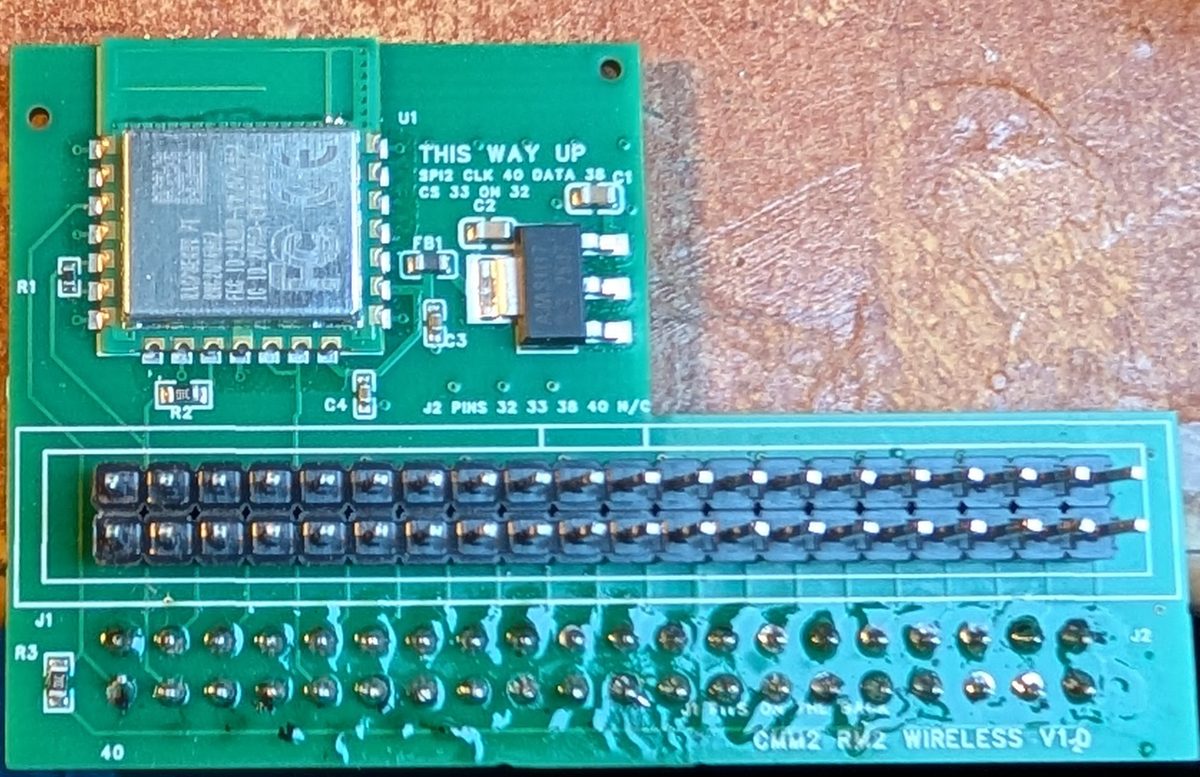
What it is
The module carries a Raspberry Pi RM2 radio module, which holds the Infineon CYW43439: the same WiFi and Bluetooth chip as the Pico W and Pico 2 W. A 40-pin socket on its back plugs onto the CMM2's rear I/O header, and a box header on its front repeats that header, so anything you already plug in there still fits.
The radio talks to the CMM2 over SPI2 and uses four of the header's pins; the other 36 pass straight through. It has its own 3.3 V regulator, fed from the header's 5 V, because the header's 3.3 V pins are rated for 100 mA and the radio draws up to 271 mA when it transmits.
- Radio
- Raspberry Pi RM2 (CYW43439): 2.4 GHz WiFi and Bluetooth
- Fits
- The CMM2's 40-pin rear I/O header, on the G1, the G2 and the G3
- Uses
- SPI2, and MMBasic pins 32, 33, 38 and 40
- Power
- Its own 3.3 V regulator, from the header's 5 V
- Firmware
- MMBasic V8.00.00 or later
- Design
- Open hardware, in EasyEDA Pro
Fitting it
Switch the CMM2 off, then push the module's socket onto the rear I/O header so that the module stands upright behind the computer.
- On a G2 or a G3, fit it with the words THIS WAY UP on the board at the top.
- On a G1, fit it upside down, with THIS WAY UP at the bottom. The G1's I/O header has its pinout rotated 180 degrees compared with the G2's, so turning the module over puts every pin in the right place.
The pins it uses
| MMBasic pin | Used for | Notes |
|---|---|---|
| 40 | SPI2 clock | Held high by a pull-up on the module, because the firmware checks this pin at power-up |
| 38 | SPI2 data | One line for both directions; the radio's interrupt shares it, as on a Pico W |
| 33 | Chip select | |
| 32 | Radio on | Switches the WiFi and Bluetooth on together |
These four pins aren't connected on the module's pass-through header. Pin 35, SPI2's input, isn't used, and passes through as an ordinary I/O pin.
When WiFi is on, SPI2 and these four pins belong to the radio, and the SPI2 commands and SETPIN on those pins give an error. Without OPTION WIFI the firmware leaves them alone, although with the module fitted they're still wired to it.
Using it
Support comes with MMBasic V8.00.00 for the CMM2, starting with its first beta, and WiFi has been confirmed working on the G1, the G2 and the G3. The networking is the PicoMite WebMite's, ported to the CMM2 as it is, so the commands work as they do on a Pico W and they're documented in the PicoMite User Manual. Programs written for a WebMite should carry over with little or no change.
Joining a network
Give the CMM2 your network's name and password once, at the command prompt:
OPTION WIFI "MyNetwork", "MyPassword"
The CMM2 restarts and joins the network in the background, which takes about 7 seconds, without holding up the prompt. It joins again every time it's switched on. Optional extra arguments set a host name (by default PICO followed by the board's ID), a fixed IP address with its mask and gateway, and a country code. Then:
PRINT MM.INFO(IP ADDRESS)   ' the address the network gave it
WEB PING "mather.host"      ' check it can reach the internet
WEB NTP 0                   ' set the clock from the internet, in UTC
WEB NTP sets the CMM2's clock, and its real-time clock too if one is fitted. Its argument is your time zone's offset from UTC in hours.
What it can do
| For | Commands |
|---|---|
| Joining and checking | OPTION WIFI, WEB SCAN, WEB PING, MM.INFO(IP ADDRESS) |
| Network time | WEB NTP |
| A web server | OPTION TCP SERVER PORT, WEB TCP INTERRUPT, WEB TCP READ, WEB TRANSMIT PAGE, FILE and CODE |
| Fetching from the web, HTTPS included | WEB OPEN TCP CLIENT, WEB OPEN TLS CLIENT, WEB TCP CLIENT REQUEST, and JSON$ to read the replies |
| UDP | OPTION UDP SERVER PORT, WEB UDP SEND, WEB UDP INTERRUPT, MM.MESSAGE$, MM.ADDRESS$ |
| MQTT | WEB MQTT CONNECT, PUBLISH, SUBSCRIBE and CLOSE, MM.TOPIC$, MM.MESSAGE$ |
| A remote console | OPTION TELNET CONSOLE ON, ONLY or OFF: the CMM2's prompt from a telnet program on another computer |
| Copying files | A TFTP server, for files to and from the SD card from another computer; OPTION TFTP OFF turns it off |
A small web server
Set the port once with OPTION TCP SERVER PORT 80, then run this. A browser pointed at the CMM2's address gets a page showing its date and time: WEB TRANSMIT PAGE fills in each {expression} in the page as it sends it.
Dim buff%(512)
Open "A:/index.html" For Output As #1
Print #1, "<html><body><h1>Colour Maximite 2</h1>"
Print #1, "<p>{Date$} {Time$}</p></body></html>"
Close #1
Print "Serving at "; MM.Info(IP ADDRESS)
WEB TCP INTERRUPT webreq
Do : Loop

Sub webreq
  Local a
  For a = 1 To MM.Info(MAX CONNECTIONS)
    WEB TCP READ a, buff%()
    If LLen(buff%()) Then WEB TRANSMIT PAGE a, "A:/index.html"
  Next a
End Sub
How fast it is
| Measured during development | Result |
|---|---|
| Joining the network at power-up | about 7 s |
| Ping from a PC on the same network | 1–6 ms |
| Transfer to and from a PC | 2.1 MB/s out, 2.4 MB/s in |
| HTTPS download, decrypted on the CMM2 | 1.1 MB/s |
| TFTP file copy | about 250 KB/s each way |
The transfer and HTTPS figures came from a test program driving the network directly; MMBasic programs add their own overheads.
Good to know
- Memory: with
OPTION WIFIset, the firmware sets aside 128 KB of memory for the network. Without it nothing is taken. On a G1 the 128 KB comes from the top of the display memory, so with WiFi on some screen modes have one page fewer: 1024 × 768 in 16-bit colour (MODE 9,16) has one page instead of two, for example. Loadable programs on a G1 still get all of the display memory, and WiFi reconnects when they end. - No SD card needed: the radio's own firmware and the network code are built into the CMM2's flash.
- Without the module: if
OPTION WIFIis set but the module isn't fitted, the CMM2 says WiFi module not found at start-up and carries on as normal, with the memory and pins free. The settings are kept for when the module goes back on. - Loadable programs: while a loadable program such as an emulator or MicroPython is running, the network isn't looked after, so connections may drop.
- Range: the module sits behind the computer, so a metal case or rear panel will cut its range.
- Bluetooth: the radio has Bluetooth too, but the firmware doesn't use it yet.
Building one
The design files are in the Pico-Computer-3 repository, named CMM2 Wifi V1.1. They hold the EasyEDA Pro project, Gerbers, and a bill of materials and placement file for a board house to make and assemble it, with LCSC part numbers.
It's a two-layer board with all its surface-mount parts on one side, so the board house can assemble those. The two 2 × 20 headers are fitted by hand: the socket on the back, which plugs into the CMM2, and the box header on the front. The RM2 radio module is sold by Raspberry Pi resellers and by LCSC.
- SchematicPDF, with the pin assignments
- GerbersZip file for the board house
- Bill of materialsExcel, with LCSC part numbers
- Placement fileExcel, for assembly
- EasyEDA Pro projectTo change the design